
Employee Portal
Overview
The Employee Portal is where employees complete their compliance tasks — trainings, policy attestations, document uploads, and incident reporting — all in one place.
Employees access the portal separately from the admin side of The Guard. The portal is organized into dedicated sections for Tasks, Trainings, Documents, and Policies, plus the ability to report an incident. All tasks, including document requests, surface on the Tasks page so employees always know what needs their attention.
- Tasks page shows overdue items, upcoming to-dos, and new or updated policies at a glance
- Dedicated sections for Trainings, Documents, and Policies
- Employees can view and download documents their admin has shared with them
- Report an Incident opens the hotline form in a new tab
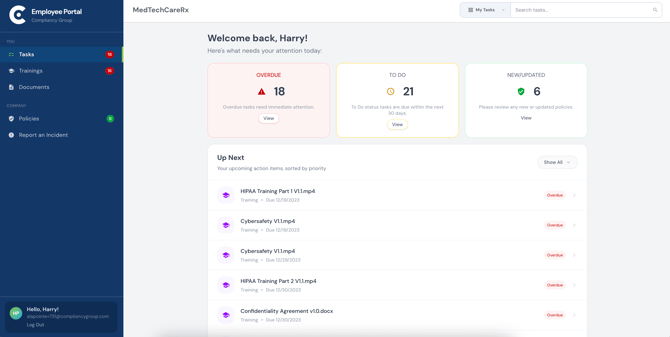
The left sidebar provides access to all sections of the portal.
Tasks : All action items overdue, to do, and new or updated policies requiring acknowledgment
Trainings: All assigned trainings with status, due date, and the ability to start or resume
Documents: Document folders shared by admins. Employees can view and download files
Policies: Company policies, where employees can review and acknowledge as required
Report an Incident: Opens the hotline incident reporting form in a new tab
Each section in the sidebar shows a badge count for items requiring attention.
Table of Contents
Tasks
The Tasks page is the employee's home page. This page shows everything that needs the employees attention, sorted by priority.
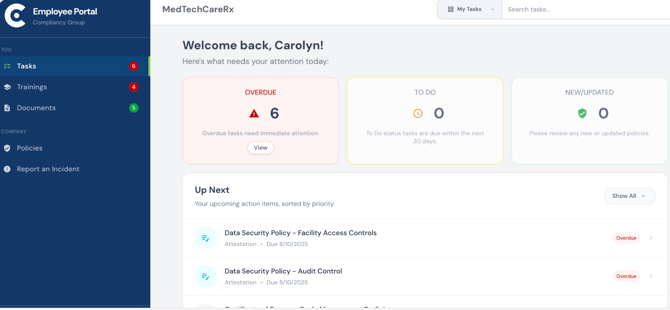
- Overdue : items that have passed their due date and need immediate attention
- To Do : items due within the next 30 days
- New/Updated : policies that are new or have been recently updated and require review
- The Up Next section lists upcoming action items sorted by priority, showing the item name, type, and due date
- Document requests assigned by an admin also appear here as tasks
Trainings
The Trainings section displays all trainings assigned to the employee, with status and due date.
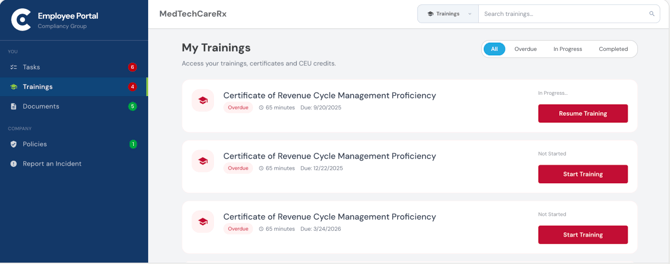
- Filter trainings by All, Overdue, In Progress, or Completed
- Each training shows its status (Overdue, In Progress, Not Started, Completed), estimated duration, and due date
- Click Start Training or Resume Training to begin or continue a training
- Search for a specific training using the search bar
Documents
The Documents section shows all document folders that have been shared with the employee by their admin.
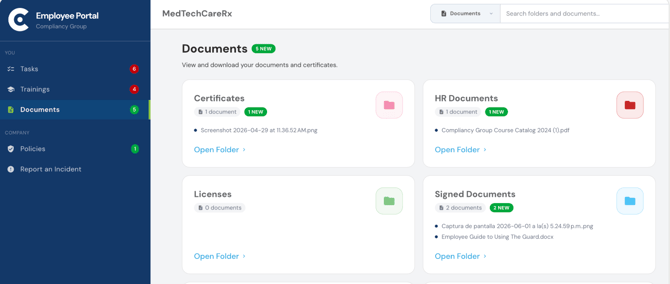
- Each folder card shows the folder name, number of documents, and a preview of recent file names
- A New badge appears on folders containing documents that have been recently added
- Click Open Folder to view and download files within a folder
- Search across all folders and documents using the search bar
- Admins control which documents and folders are visible, documents marked "Hide from Employee" at upload will not appear here
Policies
The Policies section displays all company policies so they maybe reviewed by the employee.
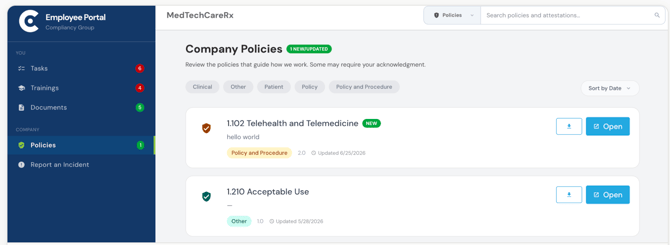
- Filter policies by category (Clinical, Other, Patient, Policy, Policy and Procedure)
- A New/Updated badge appears on policies that are new or have been recently changed
- Each policy shows its category tag, version number, and last updated date
- Click Open to read a policy, or the download icon to save a copy
- Policies requiring acknowledgment will appear as tasks on the Tasks page
For additional information on Reporting an Incident from the employee portal please see: Hotline Overview